> ## Documentation Index
> Fetch the complete documentation index at: https://docs.conduktor.io/llms.txt
> Use this file to discover all available pages before exploring further.
# Kafka RBAC — role-based access control
> Set up Kafka RBAC in Conduktor Console to control access to topics, consumer groups, and resources.
The Conduktor RBAC (Role Based Access Control) system enables you to restrict access to resources and enforce permissions at **User** and **Group** granularity. This is a critical step in ensuring that you have control over your Apache Kafka data.
With Conduktor RBAC, you can:
* configure access to Conduktor services
* configure global permissions across **multiple clusters**
* administer permissions for Kafka resources (topics, consumer groups, clusters, subjects, connectors)
## Assign permissions
You can assign two types of permissions:
* [services](#manage-services-permissions): view/manage Console services
* [resources](#manage-resources-permissions): interact with Kafka resources
And you can assign those permissions to **users** or **groups**.
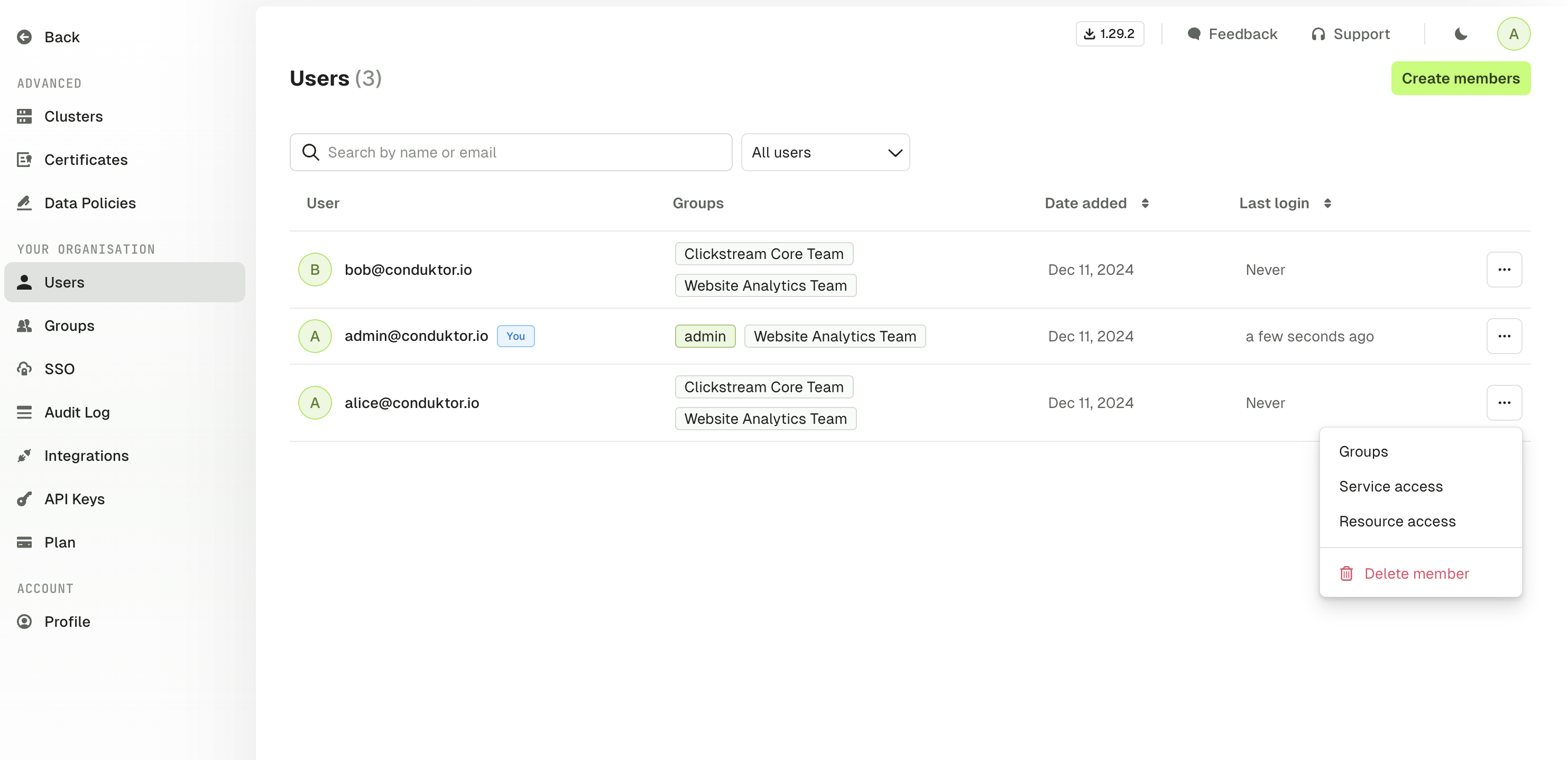
To assign user/group permissions, open Console and go to **Settings** > **Users** or **Groups**, as required. Click **...** next to the user/group you want to modify. Here's an example for a user:
 If a user belongs to multiple groups, they will **inherit all the permissions** assigned to these groups. If they have restricted access to a topic but belong to a group that has full access, they will have full access to the topic.
## Manage services permissions
You can restrict access to Conduktor Console services such as settings or left menu items (like certificates). For example, you may want to limit the number of users who can generate API keys. By default, you all users can:
* access data masking policies
* view Self-service
## Manage resources permissions
The RBAC model is very granular and allows you to customize the permissions to Kafka resources based on your requirements:
| Resource | Permissions |
| ---------------- | ---------------------------------------- |
| Topics | View config |
| Topics | Consume |
| Topics | Produce |
| Topics | Create |
| Topics | Delete |
| Topics | Empty |
| Topics | Add partitions |
| Topics | Manage metadata (labels and description) |
| Consumer groups | Viewer |
| Consumer groups | Reset |
| Consumer groups | Create |
| Consumer groups | Delete |
| Consumer groups | Manage metadata (labels) |
| Subjects | View |
| Subjects | Edit compatibility |
| Subjects | Create / Update |
| Subjects | Delete |
| Subjects | Manage metadata (labels) |
| Kafka connectors | View task and status |
| Kafka connectors | View config |
| Kafka connectors | Edit config |
| Kafka connectors | Deploy |
| Kafka connectors | Delete |
| Kafka connectors | Restart |
| Kafka connectors | Pause / Resume |
| Kafka connectors | Manage metadata (labels and description) |
| Clusters | View ACL |
| Clusters | Manage ACL |
| Clusters | View broker |
| Clusters | Edit broker |
| Clusters | Edit SR compatibility |
All these permissions can be applied on one specific cluster, or all your clusters.
## Prefixes
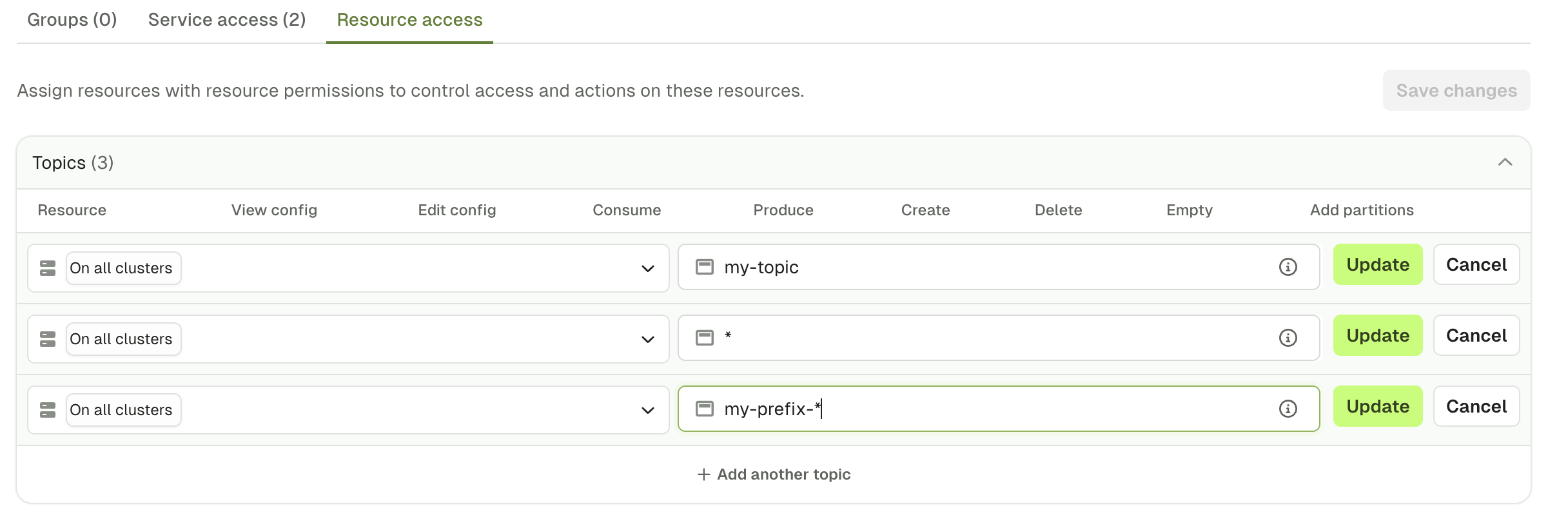
When you define a permission, you might want it to be applied to:
* a specific topic, by typing `my-topic` for instance
* all the topics, by using a wildcard `*`
* a subset that starts with a certain prefix, by typing `my-prefix-*`
Here's an example of those three cases in Console:
If a user belongs to multiple groups, they will **inherit all the permissions** assigned to these groups. If they have restricted access to a topic but belong to a group that has full access, they will have full access to the topic.
## Manage services permissions
You can restrict access to Conduktor Console services such as settings or left menu items (like certificates). For example, you may want to limit the number of users who can generate API keys. By default, you all users can:
* access data masking policies
* view Self-service
## Manage resources permissions
The RBAC model is very granular and allows you to customize the permissions to Kafka resources based on your requirements:
| Resource | Permissions |
| ---------------- | ---------------------------------------- |
| Topics | View config |
| Topics | Consume |
| Topics | Produce |
| Topics | Create |
| Topics | Delete |
| Topics | Empty |
| Topics | Add partitions |
| Topics | Manage metadata (labels and description) |
| Consumer groups | Viewer |
| Consumer groups | Reset |
| Consumer groups | Create |
| Consumer groups | Delete |
| Consumer groups | Manage metadata (labels) |
| Subjects | View |
| Subjects | Edit compatibility |
| Subjects | Create / Update |
| Subjects | Delete |
| Subjects | Manage metadata (labels) |
| Kafka connectors | View task and status |
| Kafka connectors | View config |
| Kafka connectors | Edit config |
| Kafka connectors | Deploy |
| Kafka connectors | Delete |
| Kafka connectors | Restart |
| Kafka connectors | Pause / Resume |
| Kafka connectors | Manage metadata (labels and description) |
| Clusters | View ACL |
| Clusters | Manage ACL |
| Clusters | View broker |
| Clusters | Edit broker |
| Clusters | Edit SR compatibility |
All these permissions can be applied on one specific cluster, or all your clusters.
## Prefixes
When you define a permission, you might want it to be applied to:
* a specific topic, by typing `my-topic` for instance
* all the topics, by using a wildcard `*`
* a subset that starts with a certain prefix, by typing `my-prefix-*`
Here's an example of those three cases in Console:
 ## Govern who can edit labels and descriptions
By default, anyone who can view a Kafka resource can also edit its [labels](/guide/manage-kafka/kafka-resources/topics#manage-topic-labels) and, for topics, its description. Because labels and descriptions can carry governance metadata, you may want to restrict who can change them.
Metadata governance is an opt-in behavior that gates label and description editing on a dedicated permission, separate from the permission to view or edit the resource itself. It's **off by default**, so existing deployments keep their current behavior until you turn it on.
### Permissions and behavior
Metadata governance adds one **Manage metadata** permission per resource type. The permission covers labels for all four resource types, and also covers the description for topics and connectors (the two resources with an editable description).
| Resource | Manage metadata permission | Permission enforced when governance is **off** | Permission enforced when governance is **on** |
| -------------- | ------------------------------------------------------- | ---------------------------------------------- | --------------------------------------------- |
| Topic | `topicMetadataManage` (labels and description) | View config | `topicMetadataManage` |
| Subject | `subjectMetadataManage` (labels) | Create / Update | `subjectMetadataManage` |
| Connector | `kafkaConnectorMetadataManage` (labels and description) | Edit config | `kafkaConnectorMetadataManage` |
| Consumer group | `consumerGroupMetadataManage` (labels) | Create | `consumerGroupMetadataManage` |
This only changes the dedicated label and description endpoints. Setting labels or a description as part of a full resource create or update still uses the resource's existing edit permission.
When governance is on and a user lacks the **Manage metadata** permission, the Console UI hides the label and description edit controls for that resource. Existing labels and descriptions stay visible as read-only.
### Enable metadata governance
Set the `enable_metadata_governance` property (environment variable `CDK_ENABLE_METADATA_GOVERNANCE`) to `true`. See the [Console properties reference](/guide/conduktor-in-production/deploy-artifacts/deploy-console/environment-variables#global-properties).
```yaml theme={null}
enable_metadata_governance: true
```
Turning on metadata governance changes who can edit labels and descriptions. Grant the **Manage metadata** permissions before you enable it, so the right users keep their access. See the migration guidance below.
### Grant the Manage metadata permissions
You can grant each **Manage metadata** permission like any other resource permission — directly to a user, to a group, or through the API, CLI, or Terraform. For example, in a `Group` resource:
```yaml theme={null}
apiVersion: v2
kind: Group
metadata:
name: topic-governance
spec:
displayName: Topic governance
permissions:
- resourceType: TOPIC
cluster: "*"
patternType: PREFIXED
name: ""
permissions:
- topicMetadataManage
```
Application owner groups receive the matching permission for every resource type automatically. New applications get it when their owner group is created, and Conduktor backfills existing owner groups when you upgrade — so application owners keep their label and description edit access when you enable governance.
### Migration guidance
When you enable metadata governance, who can edit labels and descriptions changes:
* **Keeps access:** application owners (through their owner group), and any user or group that holds the resource's **Manage metadata** permission. Users with a full-access permission set on the resource type already hold it.
* **Loses access:** users who could edit labels or descriptions only because they could view or partially edit the resource, without the **Manage metadata** permission.
To avoid disruption, grant the **Manage metadata** permissions to the relevant users and groups first, then enable governance.
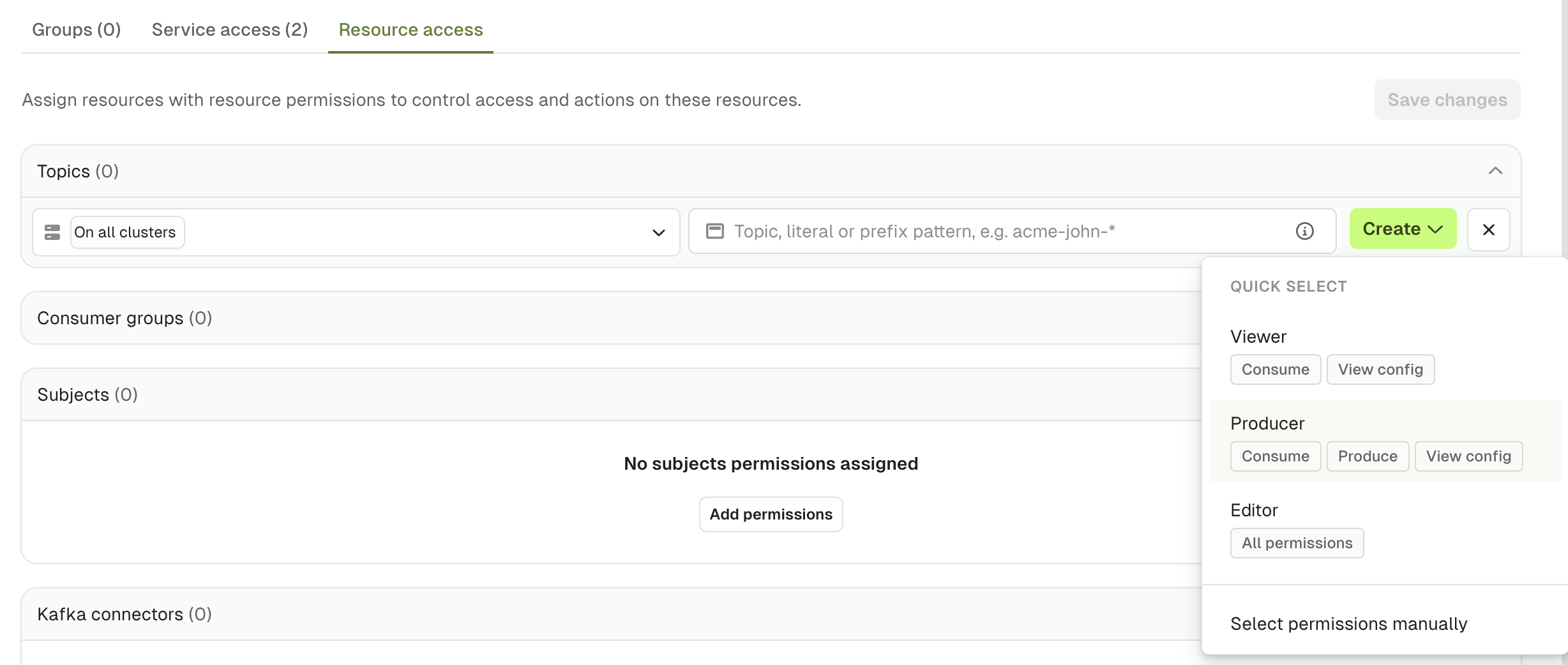
## Quick select
To save time during the permissions creation, you can use the `Quick select` to give a default set of permissions or set this up using the CLI, API or Terraform.
## Govern who can edit labels and descriptions
By default, anyone who can view a Kafka resource can also edit its [labels](/guide/manage-kafka/kafka-resources/topics#manage-topic-labels) and, for topics, its description. Because labels and descriptions can carry governance metadata, you may want to restrict who can change them.
Metadata governance is an opt-in behavior that gates label and description editing on a dedicated permission, separate from the permission to view or edit the resource itself. It's **off by default**, so existing deployments keep their current behavior until you turn it on.
### Permissions and behavior
Metadata governance adds one **Manage metadata** permission per resource type. The permission covers labels for all four resource types, and also covers the description for topics and connectors (the two resources with an editable description).
| Resource | Manage metadata permission | Permission enforced when governance is **off** | Permission enforced when governance is **on** |
| -------------- | ------------------------------------------------------- | ---------------------------------------------- | --------------------------------------------- |
| Topic | `topicMetadataManage` (labels and description) | View config | `topicMetadataManage` |
| Subject | `subjectMetadataManage` (labels) | Create / Update | `subjectMetadataManage` |
| Connector | `kafkaConnectorMetadataManage` (labels and description) | Edit config | `kafkaConnectorMetadataManage` |
| Consumer group | `consumerGroupMetadataManage` (labels) | Create | `consumerGroupMetadataManage` |
This only changes the dedicated label and description endpoints. Setting labels or a description as part of a full resource create or update still uses the resource's existing edit permission.
When governance is on and a user lacks the **Manage metadata** permission, the Console UI hides the label and description edit controls for that resource. Existing labels and descriptions stay visible as read-only.
### Enable metadata governance
Set the `enable_metadata_governance` property (environment variable `CDK_ENABLE_METADATA_GOVERNANCE`) to `true`. See the [Console properties reference](/guide/conduktor-in-production/deploy-artifacts/deploy-console/environment-variables#global-properties).
```yaml theme={null}
enable_metadata_governance: true
```
Turning on metadata governance changes who can edit labels and descriptions. Grant the **Manage metadata** permissions before you enable it, so the right users keep their access. See the migration guidance below.
### Grant the Manage metadata permissions
You can grant each **Manage metadata** permission like any other resource permission — directly to a user, to a group, or through the API, CLI, or Terraform. For example, in a `Group` resource:
```yaml theme={null}
apiVersion: v2
kind: Group
metadata:
name: topic-governance
spec:
displayName: Topic governance
permissions:
- resourceType: TOPIC
cluster: "*"
patternType: PREFIXED
name: ""
permissions:
- topicMetadataManage
```
Application owner groups receive the matching permission for every resource type automatically. New applications get it when their owner group is created, and Conduktor backfills existing owner groups when you upgrade — so application owners keep their label and description edit access when you enable governance.
### Migration guidance
When you enable metadata governance, who can edit labels and descriptions changes:
* **Keeps access:** application owners (through their owner group), and any user or group that holds the resource's **Manage metadata** permission. Users with a full-access permission set on the resource type already hold it.
* **Loses access:** users who could edit labels or descriptions only because they could view or partially edit the resource, without the **Manage metadata** permission.
To avoid disruption, grant the **Manage metadata** permissions to the relevant users and groups first, then enable governance.
## Quick select
To save time during the permissions creation, you can use the `Quick select` to give a default set of permissions or set this up using the CLI, API or Terraform.
 ## User permissions example
Here's an example of a set of permissions given to Alice:
## User permissions example
Here's an example of a set of permissions given to Alice:
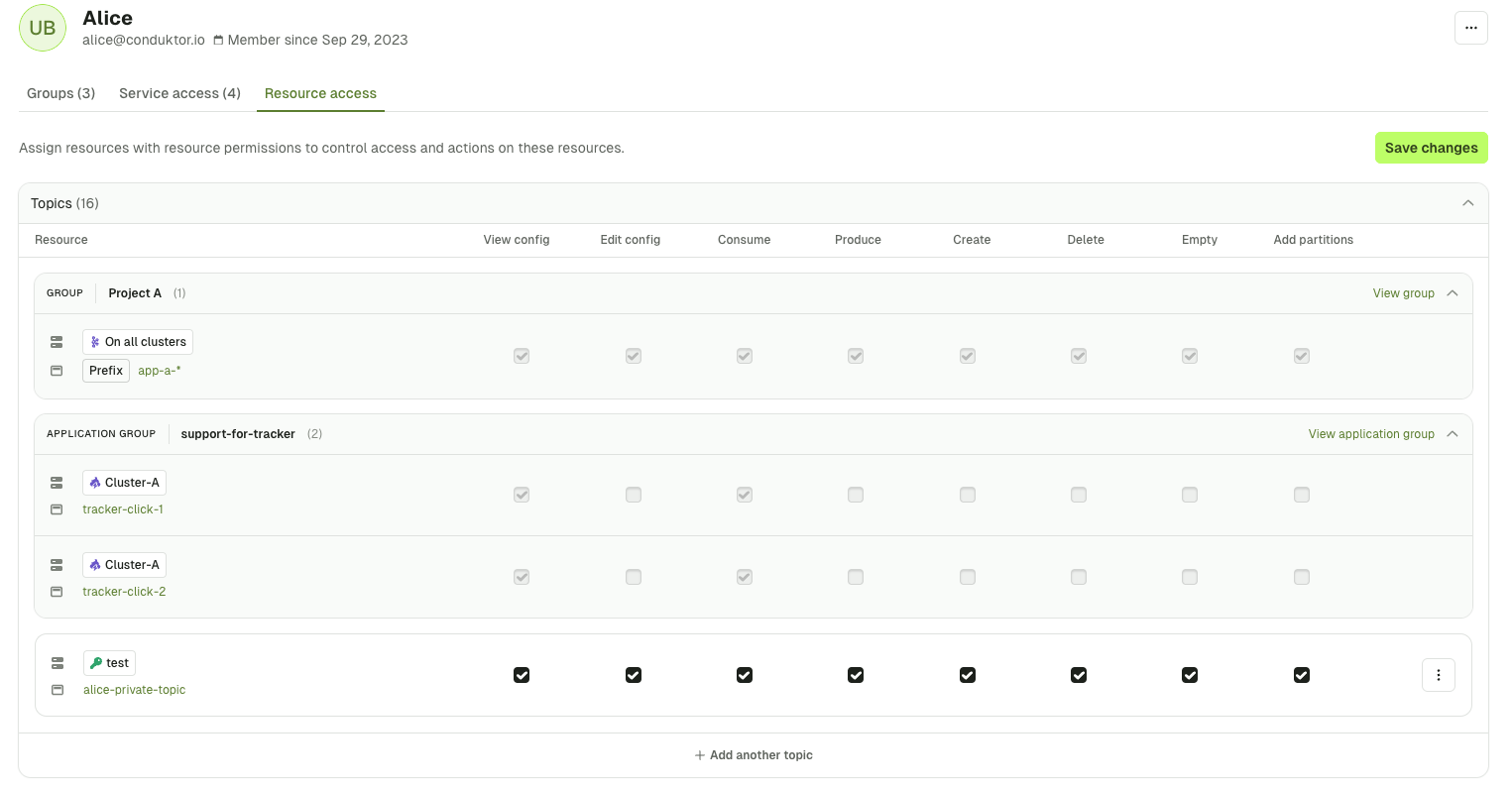 We can see that this is a recap of all the permissions this user has. In grey, we have the permissions Alice inherits from the group `Project A`, from the application `support-for-tracker` and in white the ones that are assigned to her directly.
This set of permissions gives her:
* Full access to the topic `alice-private-topic` on the cluster `test`
* Full access on all topics, that start with the prefix `app-a-`, across all clusters and that she inherits this from the group `Project A`
* Partial access to the topic `tracker-click-1` and `tracker-click-2` on the cluster `Cluster-A` and that she inherits this from the application `support-for-tracker`
## Related resources
* [Map external groups](/guide/conduktor-in-production/admin/user-access/map-external-groups)
* [Configure SSO](/guide/conduktor-in-production/admin/user-access/configure-sso)
* [Create data masking policies](/guide/conduktor-in-production/admin/data-masking)
* [Give us feedback/request a feature](https://conduktor.io/roadmap)
We can see that this is a recap of all the permissions this user has. In grey, we have the permissions Alice inherits from the group `Project A`, from the application `support-for-tracker` and in white the ones that are assigned to her directly.
This set of permissions gives her:
* Full access to the topic `alice-private-topic` on the cluster `test`
* Full access on all topics, that start with the prefix `app-a-`, across all clusters and that she inherits this from the group `Project A`
* Partial access to the topic `tracker-click-1` and `tracker-click-2` on the cluster `Cluster-A` and that she inherits this from the application `support-for-tracker`
## Related resources
* [Map external groups](/guide/conduktor-in-production/admin/user-access/map-external-groups)
* [Configure SSO](/guide/conduktor-in-production/admin/user-access/configure-sso)
* [Create data masking policies](/guide/conduktor-in-production/admin/data-masking)
* [Give us feedback/request a feature](https://conduktor.io/roadmap)